CSV to PDF
Paste CSV or open a CSV file and get a PDF table. The file is read in your browser; the header row repeats on every page and column widths follow the content.
5 rows, 6 columns. The table HTML is 1.4 KB of 256 KB allowed.
Result
Your PDF will appear here.
The free web tool prints at most the first 10 pages. For longer documents, use the API.
Retention: web-tool results are deleted after 10 minutes and no history is kept. API results are kept 1 day on the free plan and 7 days on Starter and Pro (30 days on Business).
Do this from your code
The same request, built from the input and options above. Create an account to get an API key.
curl -X POST https://api.aiipworld.com/v1/render \
  -H "Authorization: Bearer $AIIPWORLD_API_KEY" \
  -H "Content-Type: application/json" \
  -d '{"html":"","output":"pdf","options":{}}'

# returns {"job_id": "...", "status": "queued"}; then poll:
curl https://api.aiipworld.com/v1/jobs/JOB_ID -H "Authorization: Bearer $AIIPWORLD_API_KEY"Batches
The web tool handles 1 document at a time. The API takes one request per document, so you can script as many as your plan allows.
More control
Headers and footers, page ranges, scale, custom page size, wait conditions and request headers are API options. See the docs.
Retention
Web-tool results are kept 10 minutes; free API results 1 day; Starter and Pro results 7 days; Business 30 days. The web tool allows 10 conversions per minute and 50 per day per visitor.
How it works
- Paste CSV text, or open a .csv file from your computer.
- Check the separator and whether the first row is a header.
- Choose the paper size, orientation (landscape is the default for wide tables) and font size.
- Press Convert to PDF and download the file.
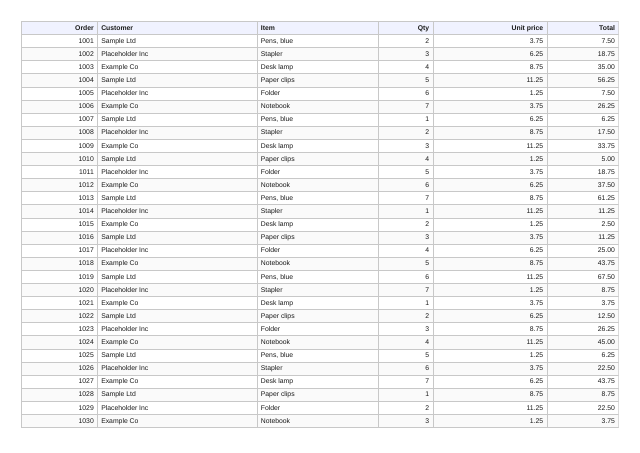
Example output
Questions
Is my CSV file uploaded?
The file is read and turned into an HTML table in your browser. The table (not the original file) is sent to our API to be printed as a PDF. The PDF is deleted after 10 minutes.
Does the header row repeat on every page?
Yes, when the first row is marked as a header. We checked this with a 48-row sample that runs to two pages.
How are column widths decided?
By the content, like an HTML table. Long text wraps inside its cell. Columns that contain only numbers are right-aligned.
Which separators are supported?
Comma, semicolon, tab and pipe. The tool guesses from the first line, and you can set it by hand. Quoted fields, doubled quotes and line breaks inside quotes are handled.
Can I convert an Excel file?
Not directly. Save the sheet as CSV from Excel or your spreadsheet app first. Formulas are not evaluated; the CSV holds the values.
How large can the CSV be?
The table HTML must fit within 256 KB, and the free tool prints at most the first 10 pages. Files over 2 MB are not opened. For larger tables use the API.
Why do some characters look wrong?
Files are read as UTF-8. If the file was saved in another encoding, re-save it as UTF-8 from your spreadsheet app.